Makify AI - AI Image Generator & Editor
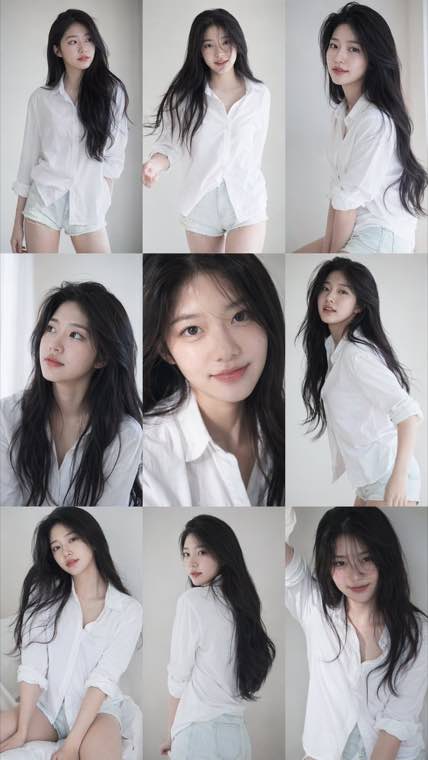
3x3 Idol Portrait Collage result

A consistent nine-frame portrait series with soft photobook lighting and natural texture.
Free Z-Image AI Image Generator - Create Photorealistic Photo Online with Z-Image

Generate stunning images and edit photos with Z-Image Turbo online. Face consistency, image-to-image editing, and turbo-speed generation — free, no GPU or downloads needed.

100 free credits daily • Turbo-speed generation • Face consistency • Image-to-image editing •

Z-Image AI image generator showing text-to-image and editing capabilities

What is Z-Image?

Z-Image is an open-source AI image generation model built for high-quality creation and editing. The Z-Image Turbo variant delivers near-instant generation while preserving face consistency, detailed textures, and compositional accuracy. Whether you need text-to-image generation, image-to-image editing, style transfer, or character-consistent artwork, z image handles it all. Our online tool gives you full access to Z-Image and zimage Turbo — no GPU, no ComfyUI, no local setup required.

Z-Image Capabilities for Creators and Professionals

From turbo-speed generation to face-consistent portraits and powerful image editing

Turbo-Speed Image Generation
  • Generate images in seconds with the Turbo variant
  • Iterate on prompts rapidly without long wait times
  • Ideal for high-volume content creation and brainstorming
  • Maintains visual quality despite faster generation speed
Z-Image Turbo generating images at high speed

Who Uses Z-Image?

Creators, professionals, and teams who need fast, high-quality AI image generation and editing

Digital artist using Z-Image for character design and illustration

Digital Artists & Illustrators

Generate concept art, character designs, and illustrations with Z-Image's face consistency and style versatility. Create character sheets with consistent identities across poses and expressions, or use z-image edit to transform sketches into polished artwork.

Photographer using Z-Image for creative photo editing and transformation

Photographers & Retouchers

Use Z-Image image-to-image editing for background replacement, style transfer, and creative photo manipulation. Transform ordinary photos into artistic renditions or generate reference images for planned shoots. The z image editor makes professional-level edits accessible.

Content creator generating social media visuals with Z-Image Turbo

Content Creators & Social Media Managers

Generate thumbnails, social media graphics, and visual content at scale with Z-Image Turbo's speed. Create consistent character-driven content across platforms while maintaining visual identity — perfect for YouTube, Instagram, and TikTok creators.

Marketing team creating campaign visuals with Z-Image

Marketing & Design Teams

Produce campaign visuals, product mockups, and marketing assets without waiting for design resources. Z-Image Turbo's speed enables A/B testing of visual concepts and rapid creative exploration for campaigns, presentations, and brand materials.

Game developer using Z-Image for concept art and character design

Game Developers & World Builders

Generate concept art for characters, environments, and props. Z-Image's face consistency ensures character identity across scenes, while style transfer handles different visual treatments for mood boards and art direction references.

Indie creator using Z-Image to prototype product visuals

Entrepreneurs & Indie Creators

Prototype product visuals, create pitch deck imagery, and build brand assets without hiring a designer. The free z-image online tool lets indie developers, authors, and small business owners produce professional visuals on any budget.

Why Choose Z-Image on Our Platform?

The fastest way to use Z-Image and Z-Image Turbo — no GPU, no setup, no compromise

Turbo-Speed Generation

Z-Image Turbo generates images in seconds. Iterate on prompts, explore variations, and maintain creative momentum without waiting — significantly faster than running zimage locally.

Best-in-Class Face Consistency

Generate multiple images of the same character with consistent facial features. Z-Image outperforms most open-source models at maintaining identity across generations — ideal for character-driven projects.

Powerful Image-to-Image Editing

Upload photos and transform them with text prompts. Style transfer, background replacement, creative filters, and structural edits — z-image edit gives you a full AI photo editor in your browser.

Zero Setup — No GPU Needed

Skip the ComfyUI configuration, model downloads, and GPU requirements. Use Z-Image and Z-Image Turbo instantly online. Same model, same quality, zero friction.

100 Free Credits Daily

Start generating with z-image ai free — 100 credits daily, no sign-up required to begin. Enough for most creative projects, prototyping sessions, and experimentation.

Switch Models Instantly

Compare Z-Image with Flux, Nano Banana, Seedream, and other models on the same platform. Switch with one click, no re-setup — find the best model for each project.

Simple Process

How to Use Z-Image Online

Generate and edit AI images in 4 simple steps — no setup required

1

Describe or Upload

Type a text prompt describing the image you want, or switch to image-to-image mode and upload a reference photo. Be specific about subject, style, lighting, and composition for best results with Z-Image Turbo.

2

Pick Your Model and Settings

Select Z-Image from the model menu — or swap in Flux, Nano Banana, and other leading models for a side-by-side test — then set your aspect ratio and options. Keep the default Turbo pipeline for the fastest possible generation.

3

Generate with Z-Image Turbo

Click Generate. Z-Image Turbo delivers results in seconds. Refine your prompt, adjust parameters, try different styles, or upload a new reference — iterate rapidly until you find the perfect image.

4

Edit and Download

Use the built-in editor for final adjustments. Download your z image creation in high resolution for social media, print, presentations, or any creative project.

FAQ about Z-Image and Z-Image Turbo

Everything you need to know about using Z-Image, Z-Image Turbo, and how they compare to other AI image generators


Start Creating with Z-Image Turbo — Free Online

Generate stunning AI images and edit photos with Z-Image Turbo. 100 free credits daily, no GPU or setup needed. Try it now.

00HOUR
:
00MIN
:
00SEC
🔥 50% Off — unlock unlimited creativity
Claim